新物
独立测评TechCrunch / Robot Review Desk
TechCrunch / Robot Review Desk · loona petbot review
Loona companion-robot interaction and long-term review
打开原文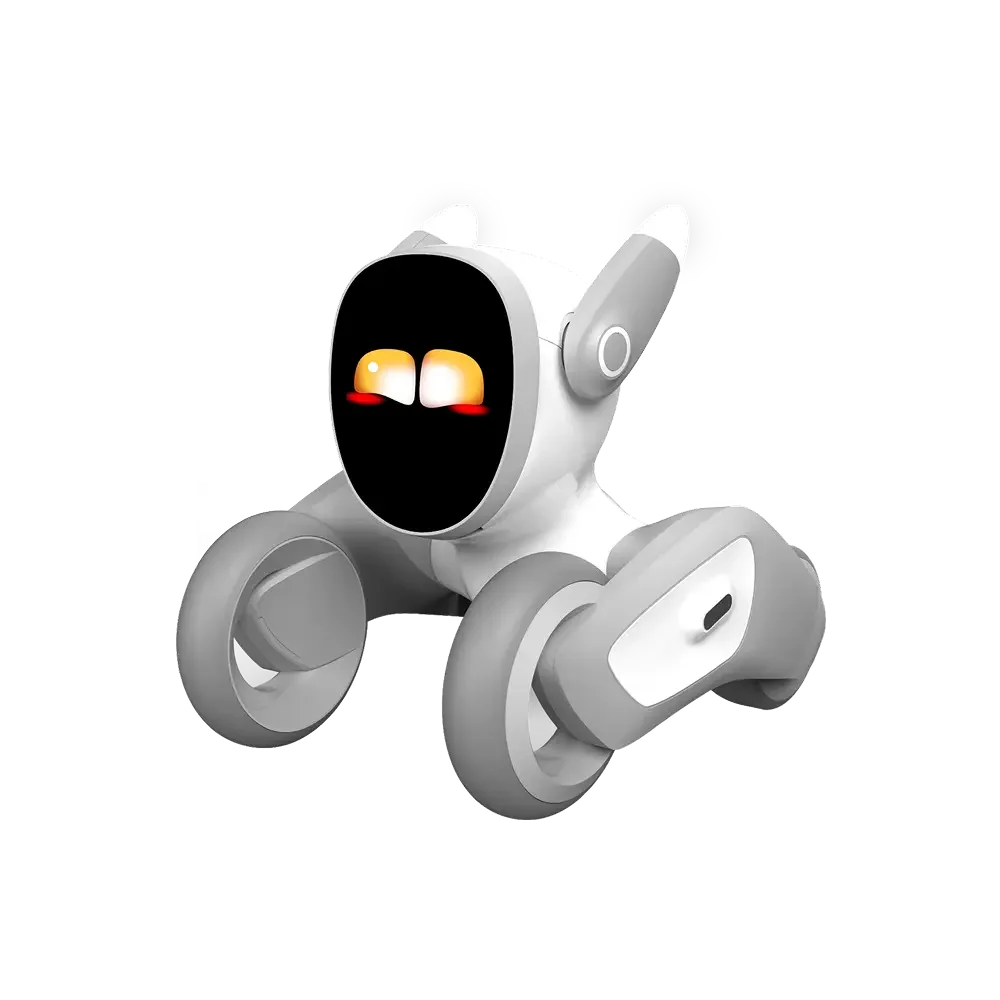
它会跑、会用表情回应你,也需要一块安全的活动空间,适合把电子宠物放进日常生活的人
这里单独列出拆解、独立测评、现场体验或深度讲解。它们用于补充官方规格,不能替代品牌说明,也不代表本站亲自实测。
Loona companion-robot interaction and long-term review
打开原文每一行都对应一个真实决策;找不到可靠资料的地方直接标为“未公开”或“未实测”。
先把硬件本身看清楚,再去看它能不能进入你的工作和生活
当前已核验 1 张独立产品资料图;资料不足时保留真实缺口,继续补充来源后再扩充。
Loona 和固定在桌面上的机器人不太一样,它会在地面上跑,会用表情、声音和动作回应你
你买到的不是一个摆件,而是家里多了一个需要充电、需要空间、也需要一点时间陪它玩的设备
它有趣的地方在于会主动靠近和探索,麻烦也在于家里的地毯、台阶和线材都会变成它要面对的环境
Loona 体积约 8.3 × 6.8 × 6.8 英寸,重量约 2.42 磅,配有 2.4 英寸 LCD、720p 摄像头和 2W 扬声器,已经不是只能放在桌上的小摆件
它有 3D ToF、触摸、三轴加速度计和三轴陀螺仪,配合四麦克风阵列感知距离、姿态、声音和触碰,移动时会不断判断周围环境
1350mAh 电池、双频 Wi‑Fi、2GB 内存和 8GB 存储共同支撑它的视觉和互动功能,电量、地面材质和网络都会影响实际表现
ToF负责测距离,陀螺仪和加速度计负责判断姿态,摄像头负责看见环境,传感器越多也越需要在自己家里试过才知道好不好用
刚开始可以从简单的互动和小游戏开始,观察它会不会听见你的声音,动作是否连贯,玩几次以后还愿不愿意继续
如果家里空间比较小,移动范围会受到限制,机器人一直撞到桌脚,体验很快就会变成帮它搬东西
我更愿意看它能不能形成一点固定习惯,比如下班后跑过来打个招呼,或者在桌边安静待一会儿
开箱以后先充电并连接 App,再找一块平整的地面试运行,不要一开始就把它放到复杂的房间里
电线、台阶、厚地毯和宠物的水碗都要提前注意,能不能顺利回充也要在自己的家里试过才知道
如果它需要联网才能使用部分功能,换网和重新绑定的方法要先记下来,之后搬家或换路由器会用到
屏幕上的表情让你更容易看懂它现在的状态,摄像头和 ToF 让它能看见人和空间,麦克风阵列则负责听见你的声音
这些部件一起工作时,Loona 才会像一个会移动的小伙伴,只看参数表里的摄像头像素,解释不了它为什么会在桌边停下来
网络和软件更新会持续改变玩法,想长期使用就要接受它的能力会随着 App 版本变化
Loona 适合喜欢宠物机器人、家里有一块相对开阔地面、也愿意每天和它互动的人
如果你想要一个安静的桌面摆件,或不喜欢家里有设备到处移动,它可能会增加整理和看护的负担
购买时还要确认版本、配件、语言和服务费用,别只看一段机器人在空房间里跑得很顺的视频
ToF 和摄像头能帮助它判断距离,但不能替你处理所有台阶、电线、地毯和水,家里的路线仍然要先整理
电池和网络都会影响回充、互动和远程功能,出现停在角落或找不到底座的情况时,要从地面、光线和网络一起排查
摄像头会看到房间和家人,放在卧室、儿童房或有客人来访的地方时,要提前想好隐私和关闭方式
我觉得 Loona 最容易被喜欢的地方,是它会移动,会自己找你,家里真的会多出一点陪伴感
它不会替你打扫,也不会把家务做完,选择它的人应该是想要一个会回应的小伙伴,而不是想买一台万能机器
如果你愿意给它留出空间,也愿意接受偶尔的碰撞和充电,它才有机会从开箱的新鲜感变成家里的一员
如果想了解我们运营的陪伴硬件项目,可以查看花衍科技。这是关联项目介绍,不作为 Loona 的产品资料来源或对比测试结论。
本页记录 37 条 URL;其中 7 个独立来源组通过质量门槛,目标为 50 个。独立域名 7 个,已审 URL 行 37 条。还缺 43 个独立高质量来源,资料不足时保留缺口,不用重复链接凑数。 图片也单独标出来源,编辑判断不会冒充品牌规格。
loona:可核查的产品、技术、服务或独立报道资料
loona:可核查的产品、技术、服务或独立报道资料
loona 官方产品定位、规格或购买资料
loona 官方产品定位、规格或购买资料
loona 官方支持、手册、FAQ 或服务条件
loona 官方产品定位、规格或购买资料
loona 官方支持、手册、FAQ、固件或 SDK 资料
loona 官方支持、手册、FAQ、固件或 SDK 资料
loona 官方支持、手册、FAQ、固件或 SDK 资料
Loona feature explanations, firmware updates, setup and troubleshooting guides
Loona feature explanations, firmware updates, setup and troubleshooting guides
Loona feature explanations, firmware updates, setup and troubleshooting guides
Loona feature explanations, firmware updates, setup and troubleshooting guides
Loona feature explanations, firmware updates, setup and troubleshooting guides
Loona feature explanations, firmware updates, setup and troubleshooting guides
Loona feature explanations, firmware updates, setup and troubleshooting guides
Loona feature explanations, firmware updates, setup and troubleshooting guides
Loona feature explanations, firmware updates, setup and troubleshooting guides
Loona feature explanations, firmware updates, setup and troubleshooting guides
Loona feature explanations, firmware updates, setup and troubleshooting guides
Loona feature explanations, firmware updates, setup and troubleshooting guides
Loona feature explanations, firmware updates, setup and troubleshooting guides
Loona feature explanations, firmware updates, setup and troubleshooting guides
Loona feature explanations, firmware updates, setup and troubleshooting guides
Loona feature explanations, firmware updates, setup and troubleshooting guides
Loona feature explanations, firmware updates, setup and troubleshooting guides
Loona feature explanations, firmware updates, setup and troubleshooting guides
Loona feature explanations, firmware updates, setup and troubleshooting guides
Loona feature explanations, firmware updates, setup and troubleshooting guides
Loona feature explanations, firmware updates, setup and troubleshooting guides
Loona feature explanations, firmware updates, setup and troubleshooting guides
Loona companion-robot interaction and long-term review
Loona companion-robot interaction and long-term review
Loona companion-robot interaction and long-term review
Loona companion-robot interaction and long-term review
Loona companion-robot interaction and long-term review