新物
静坐仍需观察,串口安静也不等于空房
PIR主要看红外变化,LD2410则用毫米波回波识别运动和微动;它能提供静坐场景的另一种观测,但风扇、窗帘和背面移动同样可能造成误触发。本例不是把一个presence开关接上就承诺房间里有人。完成物包括移动/静止报告、可调gate门限、通信资格和四组对照记录。
节点先分开两个问题:雷达是否刚报告了状态,以及报告是否为有人。型号/固件未确认、没有报告或报告陈旧都不能解释成无人。本站已做的软件检查只验证声明范围,指定硬件、房间与HA实验均待执行。
参考:[1] 厂家LD2410B资料:说明书V1.09、协议V1.08与2.44固件介绍[2] ESPHome2026.9.1 LD2410实现与参数控件
B型五孔不是C型针序
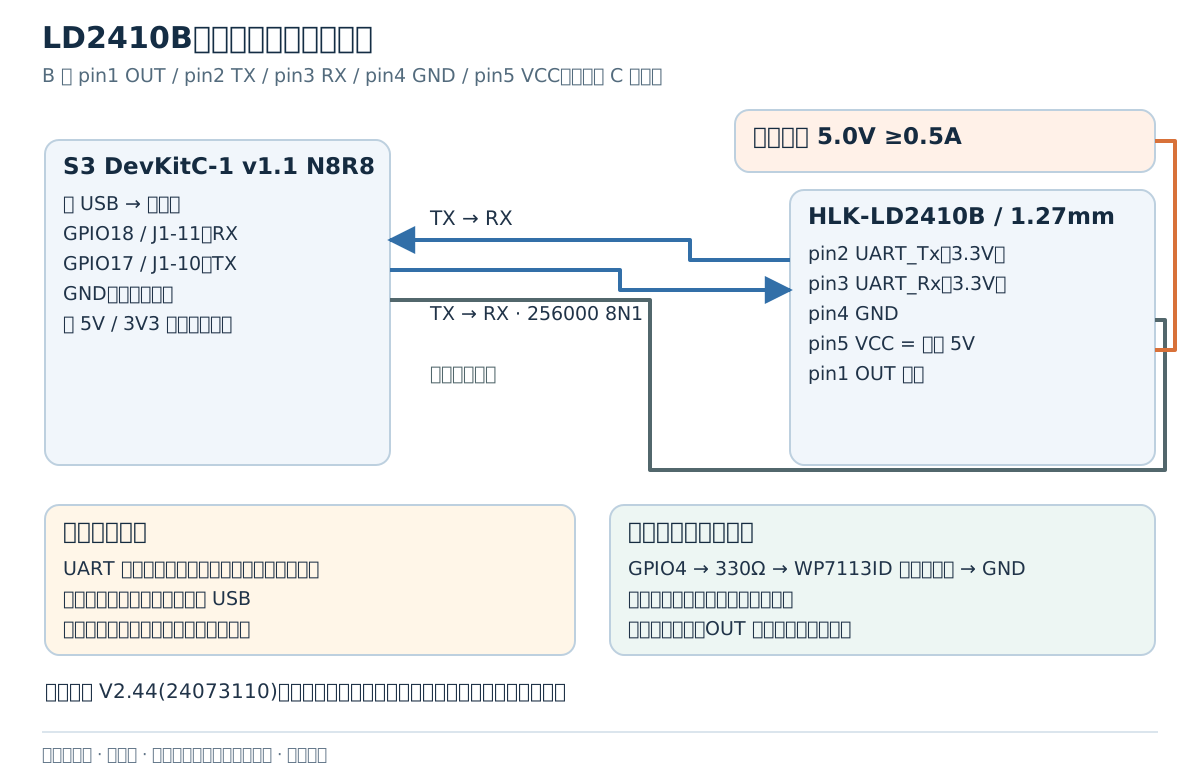
固定HLK-LD2410B、目标固件V2.44(24073110),按厂家B型V1.09手册核7×35mm/1.27mm五孔。必须使用匹配线束并逐脚量通;不能拿C型2.54mm模块或未标型号板照接。B型pin1 OUT留空,pin2 UART_Tx接S3 GPIO18/J1-11,pin3 UART_Rx接GPIO17/J1-10,pin4共地,pin5只接独立5V。
开发板由桥USB供电,独立5.0V≥0.5A只给雷达、负端共地,正端不并板5V/3V3。厂家要求雷达供电能力>200mA,平均电流不能代替峰值;TX为3.3V,不把电源接GPIO。先全断电接好,预装信号开关在两边有电后闭合;停机先断信号/雷达再断板USB,避免未供电端被TX反供电,仍需实测或专门电路保护。GPIO4经330Ω到WP7113ID阳极、阴极地。
| B型端点 | 接到 |
|---|---|
| pin2 UART_Tx | GPIO18 / J1-11(ESP32 RX) |
| pin3 UART_Rx | GPIO17 / J1-10(ESP32 TX) |
| pin4 GND / pin5 VCC | 共地 / 独立5V;不并板正电源 |
| pin1 OUT | 留空;不作通信健康信号 |
参考:[1] 厂家LD2410B资料:说明书V1.09、协议V1.08与2.44固件介绍[6] 官方S3 v1.1引脚与单电源边界[8] B型说明书V1.09:外形、五孔、供电与安装
检查完整上报帧,绕开旧值重发
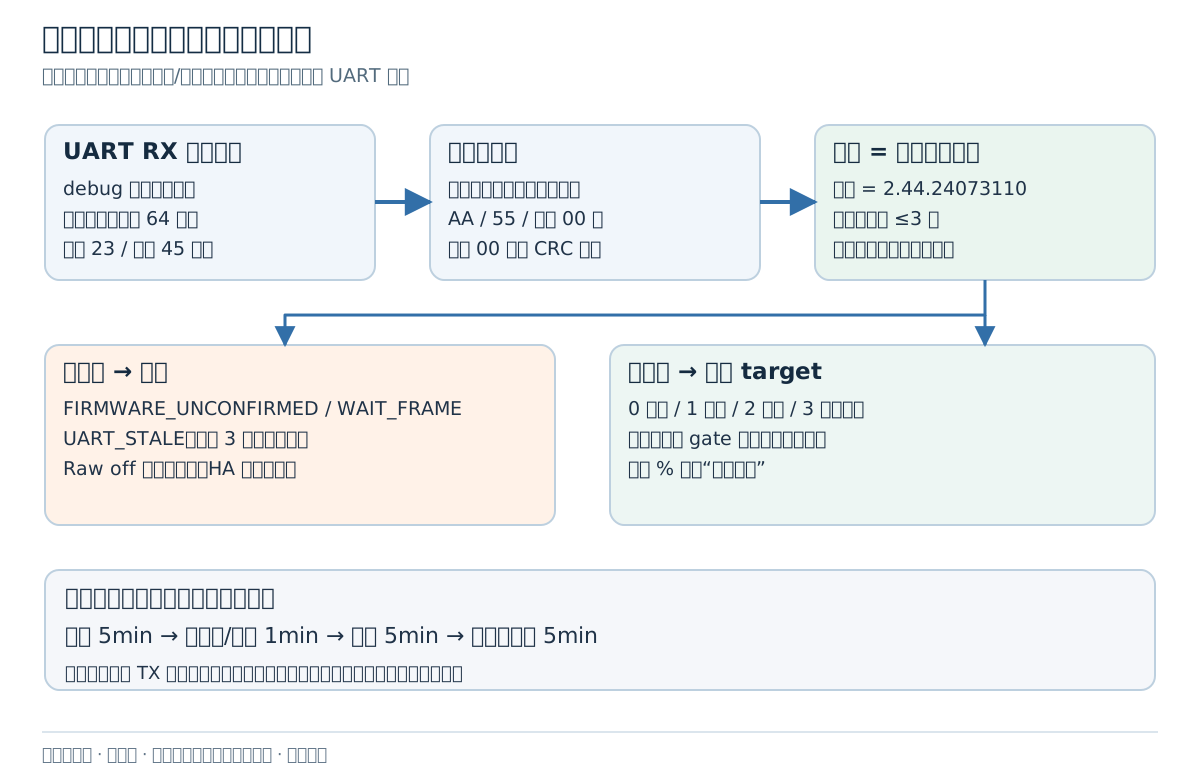
presence_watch.h是固件与主机共用的唯一资格规则。它检查正常23字节/工程45字节报告的头、长度、类型、AA/55、固定00检查位、状态与尾;固定00并非CRC算法。最多64字节缓冲,分片保留、坏帧拒绝,完全相同的好报告也刷新last_frame。
不能用距离on_value当心跳:当前LD24xx会去重,默认传感器filter又可能重发旧值。UART debug仅观察RX,不抢走ld2410组件读取;版本须等于2.44.24073110且有效帧年龄≤3秒才合格。其余时Phase为FIRMWARE_UNCONFIRMED/WAIT_FRAME/UART_STALE,原始presence off不能直接驱动“无人关灯”。
计时统一取IDF5.5.5的esp_timer_get_time(),以64位保留启动后微秒再除1000转毫秒,不把32位millis扩大后冒充长期时钟。超时比较不会因约49.7天的32位完整周期让旧状态复活;这是同源注入时刻检查,不是已运行49天的实测。
// SPDX-License-Identifier: MIT
#pragma once
#include <array>
#include <cstddef>
#include <cstdint>
#ifdef ESP_PLATFORM
#include "esp_timer.h"
#endif
namespace h05 {
#ifdef ESP_PLATFORM
// IDF monotonic microseconds since boot, widened before conversion; no 32-bit millis cycle.
inline uint64_t now_ms(){return static_cast<uint64_t>(esp_timer_get_time())/1000ULL;}
#endif
// Observe protocol frames, not deduplicated sensor values. No radar algorithm.
class Monitor {
 public:
  void version(bool matches) { version_ok_=matches; }
  void feed(uint8_t byte,uint64_t now) {
    constexpr uint8_t header[4]={0xF4,0xF3,0xF2,0xF1};
    if(pos_<4) {
      if(byte==header[pos_]) data_[pos_++]=byte;
      else {pos_=byte==header[0]?1:0;if(pos_)data_[0]=byte;}
      return;
    }
    data_[pos_++]=byte;
    if(pos_==6) {
      size_t length=size_t(data_[4])+(size_t(data_[5])<<8);
      if(length!=13 && length!=35) {++invalid_;pos_=0;return;}
      expected_=length+10;
    }
    if(pos_<expected_ || pos_<6)return;
    bool good=data_[7]==0xAA && data_[8]<=3 && data_[11]<=100 && data_[14]<=100;
    good=good && ((data_[6]==2&&expected_==23)||(data_[6]==1&&expected_==45));
    good=good && data_[expected_-6]==0x55 && data_[expected_-5]==0x00;
    constexpr uint8_t footer[4]={0xF8,0xF7,0xF6,0xF5};
    for(size_t i=0;i<4;++i)good=good&&data_[expected_-4+i]==footer[i];
    if(good){seen_=true;last_=now;target_=data_[8];++frames_;}
    else ++invalid_;
    pos_=0;expected_=0;
  }
  bool fresh(uint64_t now)const{return seen_&&now>=last_&&now-last_<=3000;}
  bool valid(uint64_t now)const{return version_ok_&&fresh(now);}
  bool present(uint64_t now)const{return valid(now)&&target_!=0;}
  bool moving(uint64_t now)const{return valid(now)&&(target_&1);}
  bool still(uint64_t now)const{return valid(now)&&(target_&2);}
  uint64_t age(uint64_t now)const{return seen_&&now>=last_?now-last_:0;}
  uint32_t frames()const{return frames_;}
  uint32_t invalid()const{return invalid_;}
  const char* phase(uint64_t now)const {
    if(!version_ok_)return "FIRMWARE_UNCONFIRMED";
    if(!seen_)return "WAIT_FRAME";
    if(!fresh(now))return "UART_STALE";
    return target_==0?"EMPTY":target_==1?"MOVING":target_==2?"STILL":"MOVING_AND_STILL";
  }
 private:
  std::array<uint8_t,64> data_{};
  size_t pos_=0,expected_=0;
  uint8_t target_=0;
  uint64_t last_=0;
  uint32_t frames_=0,invalid_=0;
  bool seen_=false,version_ok_=false;
};
inline Monitor& monitor(){static Monitor value;return value;}
}
参考:[1] 厂家LD2410B资料:说明书V1.09、协议V1.08与2.44固件介绍[2] ESPHome2026.9.1 LD2410实现与参数控件[3] LD24xx去重与固件字符串格式[4] 固定UART debug观察路径[9] B型串口协议V1.08:上报帧与门限[11] IDF5.5.5 esp_timer:64位启动后单调微秒
完整配置:版本、工程模式与门限都可读回
把本节保存为esp32-ld2410-presence.yaml,与上一节presence_watch.h放同一目录;下载包还含固定requirements、完整锁、secrets占位、README、MIT和空记录。Python3.12.13/ESPHome2026.9.1/原生IDF5.5.5复用H01环境,填写私有Wi-Fi及新生成的base64 API/OTA key后,先esphome config,再compile、run --device实际桥口,最后115200查日志。完整安装与恢复命令在README自洽给出。
UART显式256000 8N1,桥日志仍UART0;版本来自实际查询,配置不会自动升级、改波特率、覆盖门限或factory reset。不同固件先保存读回并回厂家核对,不能删除版本门就宣称同样适用。本地灯合格有人时亮、空房关、不合格闪,只是软件命令。
substitutions:
  node_name: hixinwu-h05
esphome:
  name: ${node_name}
  friendly_name: Hixinwu H05
  min_version: 2026.9.1
  includes:
    - presence_watch.h
esp32:
  board: esp32-s3-devkitc-1
  variant: ESP32S3
  flash_size: 8MB
  flash_mode: qio
  flash_frequency: 80MHz
  toolchain: esp-idf
  framework:
    type: esp-idf
    version: 5.5.5
psram:
  mode: octal
  speed: 80MHz
logger:
  baud_rate: 115200
  hardware_uart: UART0
  level: DEBUG
api:
  encryption:
    key: !secret api_key
  reboot_timeout: 0s
ota:
  - platform: esphome
    encryption:
      key: !secret api_key
wifi:
  ssid: !secret wifi_ssid
  password: !secret wifi_password
  reboot_timeout: 0s
  ap:
    ssid: "${node_name} Recovery"
    password: !secret fallback_password
    ap_timeout: 90s
captive_portal:

uart:
  id: radar_uart
  tx_pin: GPIO17
  rx_pin: GPIO18
  baud_rate: 256000
  data_bits: 8
  parity: NONE
  stop_bits: 1
  rx_buffer_size: 512
  debug:
    direction: RX
    dummy_receiver: false
    after:
      bytes: 64
      timeout: 50ms
      delimiter: [0xF8, 0xF7, 0xF6, 0xF5]
    sequence:
      - lambda: |-
          for (uint8_t byte : bytes) h05::monitor().feed(byte,h05::now_ms());
ld2410:
  id: radar
  uart_id: radar_uart
switch:
  - platform: gpio
    id: indicator
    pin: GPIO4
    internal: true
    restore_mode: ALWAYS_OFF
  - platform: ld2410
    engineering_mode:
      name: Engineering Mode
select:
  - platform: ld2410
    distance_resolution:
      name: Distance Resolution
text_sensor:
  - platform: ld2410
    version:
      name: Radar Firmware Version
      on_value:
        - lambda: h05::monitor().version(x == "2.44.24073110");
  - platform: template
    name: Radar Phase
    lambda: return {h05::monitor().phase(h05::now_ms())};
    update_interval: 1s
binary_sensor:
  - platform: template
    name: Radar Input Valid
    lambda: return h05::monitor().valid(h05::now_ms());
  - platform: template
    name: Radar Presence Raw
    device_class: occupancy
    lambda: return h05::monitor().present(h05::now_ms());
  - platform: template
    name: Radar Moving Raw
    lambda: return h05::monitor().moving(h05::now_ms());
  - platform: template
    name: Radar Still Raw
    lambda: return h05::monitor().still(h05::now_ms());
sensor:
  - platform: template
    name: Valid Frame Count
    lambda: return h05::monitor().frames();
    update_interval: 1s
    accuracy_decimals: 0
  - platform: template
    name: Rejected Frame Count
    lambda: return h05::monitor().invalid();
    update_interval: 1s
    accuracy_decimals: 0
  - platform: template
    name: Last Frame Age
    lambda: return h05::monitor().age(h05::now_ms()) / 1000.0f;
    unit_of_measurement: s
    update_interval: 1s
  - platform: ld2410
    moving_energy:
      name: Last Moving Energy
    still_energy:
      name: Last Still Energy
    g0:
      move_energy:
        name: Gate 0 Last Move Energy
      still_energy:
        name: Gate 0 Last Still Energy
    g1:
      move_energy:
        name: Gate 1 Last Move Energy
      still_energy:
        name: Gate 1 Last Still Energy
    g2:
      move_energy:
        name: Gate 2 Last Move Energy
      still_energy:
        name: Gate 2 Last Still Energy
    g3:
      move_energy:
        name: Gate 3 Last Move Energy
      still_energy:
        name: Gate 3 Last Still Energy
    g4:
      move_energy:
        name: Gate 4 Last Move Energy
      still_energy:
        name: Gate 4 Last Still Energy
    g5:
      move_energy:
        name: Gate 5 Last Move Energy
      still_energy:
        name: Gate 5 Last Still Energy
    g6:
      move_energy:
        name: Gate 6 Last Move Energy
      still_energy:
        name: Gate 6 Last Still Energy
    g7:
      move_energy:
        name: Gate 7 Last Move Energy
      still_energy:
        name: Gate 7 Last Still Energy
    g8:
      move_energy:
        name: Gate 8 Last Move Energy
      still_energy:
        name: Gate 8 Last Still Energy
number:
  - platform: ld2410
    timeout:
      name: Radar Unoccupied Hold
    max_move_distance_gate:
      name: Max Moving Gate
    max_still_distance_gate:
      name: Max Still Gate
    g0:
      move_threshold:
        name: Gate 0 Move Threshold
      still_threshold:
        name: Gate 0 Still Threshold
    g1:
      move_threshold:
        name: Gate 1 Move Threshold
      still_threshold:
        name: Gate 1 Still Threshold
    g2:
      move_threshold:
        name: Gate 2 Move Threshold
      still_threshold:
        name: Gate 2 Still Threshold
    g3:
      move_threshold:
        name: Gate 3 Move Threshold
      still_threshold:
        name: Gate 3 Still Threshold
    g4:
      move_threshold:
        name: Gate 4 Move Threshold
      still_threshold:
        name: Gate 4 Still Threshold
    g5:
      move_threshold:
        name: Gate 5 Move Threshold
      still_threshold:
        name: Gate 5 Still Threshold
    g6:
      move_threshold:
        name: Gate 6 Move Threshold
      still_threshold:
        name: Gate 6 Still Threshold
    g7:
      move_threshold:
        name: Gate 7 Move Threshold
      still_threshold:
        name: Gate 7 Still Threshold
    g8:
      move_threshold:
        name: Gate 8 Move Threshold
      still_threshold:
        name: Gate 8 Still Threshold
button:
  - platform: ld2410
    query_params:
      name: Query Radar Parameters
interval:
  - interval: 250ms
    then:
      - lambda: |-
          auto &m=h05::monitor();
          bool on=m.valid(h05::now_ms())?m.present(h05::now_ms()):(h05::now_ms()/500)%2;
          if(on) id(indicator).turn_on(); else id(indicator).turn_off();
参考:[1] 厂家LD2410B资料:说明书V1.09、协议V1.08与2.44固件介绍[2] ESPHome2026.9.1 LD2410实现与参数控件[4] 固定UART debug观察路径[10] B型V2.44(24073110)固件资料
先保存基线,再一次改一个gate
上电先Query Radar Parameters,记录版本、分辨率、timeout、最大move/still gate和g0..g8两类门限到parameters.csv。将Distance Resolution明确选择0.75m并查询确认;本篇gate距离解释只在此分辨率下成立。当前ESPHome最大gate控件为2..8,与厂家手册提到1..8的范围有差异,按实际控件操作,不强写不支持值。
能量0..100虽在UI显示%,不是有人概率;超过门限才触发,提高门限降低敏感度,100可屏蔽对应gate。timeout是雷达无人保持,不能与3秒通信看门限混用。工程模式才能观察逐gate能量,Last值需一起看有效帧和模式。先保存全部原值,空房找干扰gate,按单gate/单门限加5或10的一步变化再读回;参数会保留到雷达非易失存储,断电不保证撤销,回退按原记录逐项恢复。
参考:[1] 厂家LD2410B资料:说明书V1.09、协议V1.08与2.44固件介绍[2] ESPHome2026.9.1 LD2410实现与参数控件
让HA把未知显示为不可用
HA Core2026.10.2资料范围内,设置→设备与服务→ESPHome,填真实IP/key;先在开发者工具→状态核实际entity_id。主YAML的Radar Presence/Moving/Still Raw是诊断源,错误或陈旧时off不等于无人。下方ha-package.yaml用Input Valid与源状态共同决定availability。
将package和示例packages入口合并进现有HA配置,已有homeassistant键不能重复建,ID改成自己的实际值;执行HA自己的配置检查后重载/重启。节点/HA网络离线与UART断开分别验,Qualified Presence应不可用而非静默变空房。作者只检查文件语法,未执行HA配置检查、集成或模板运行。
template:
  - binary_sensor:
      - name: "H05 Qualified Presence"
        unique_id: hixinwu_h05_qualified_presence
        device_class: occupancy
        availability: >-
          {{ is_state('binary_sensor.hixinwu_h05_radar_input_valid', 'on')
             and states('binary_sensor.hixinwu_h05_radar_presence_raw') in ['on','off'] }}
        state: >-
          {{ is_state('binary_sensor.hixinwu_h05_radar_presence_raw', 'on') }}
参考:[5] HA Core2026.10.2 template binary_sensor[7] Home Assistant官方ESPHome集成入口与加密配置
空房、走动、静坐和风扇分别留一轮
固定高度/朝向、供电、0.75m分辨率、门限与timeout:空房5分钟;近/远座位各移动1分钟;同一人静坐5分钟;人离开后仅风扇运行5分钟。每轮记录实际人/扇、presence/moving/still、帧数/年龄、所有参数与日志。保留自然呼吸微动,不将静坐等同数学静止;厂家6m/±60°是条件参考,不是本站可靠距离。一次只改一个因素再复跑。
先断电预装TX→RX低压SPST,已有有效报告后断开,超过3秒资格关闭/Phase陈旧,HA包装不可用;闭合等好帧恢复。另做断电移除雷达后冷启动,区分未确认与空房。不带电拔供电线,不把所有线路故障都称可诊断;实体动作结果目前为空。
- 做到这里,你应该看到
- 原始参数与每轮场景可追溯;通信丢失不会被包装成已确认无人。
参考:[1] 厂家LD2410B资料:说明书V1.09、协议V1.08与2.44固件介绍[2] ESPHome2026.9.1 LD2410实现与参数控件[5] HA Core2026.10.2 template binary_sensor
先恢复通信,再判断房间
乱码或零帧先查B型针序、共地、TX/RX交叉、256000 8N1和5V下陷;禁止用5V试探GPIO。版本不合先核型号/固件;参数误设按保存基线恢复并查询,不随意factory reset。常有人查风扇/窗帘/背面振动、工程能量和timeout;常空先看资格门,再看实际位置,不能一味降全部门限。上传失败回桥USB与BOOT/EN,Wi-Fi失败用90秒恢复热点,API不匹配重新配置真实key。
主机直接用相同头检查正常/工程帧、分片、不变值重复、坏长/尾、版本、空/移/静、陈旧、64位跨界及完整32位周期后仍失效;构建与config真实结果另列证据。没有雷达、房间、UART电气或HA模拟,observations.csv只表头。可继续对照PIR教程,比较同一静坐场景,而非把两种传感器结果混写。
2026-10-18已实际执行config与完整固件compile,均Exit0;OTA 880992字节。三组host同源检查均Exit0;这些是软件结果,未执行烧录/HA/实物试验。
clang++ -std=c++17 -Wall -Wextra -Werror host_check.cpp -o /tmp/h05-host
/tmp/h05-host参考:[1] 厂家LD2410B资料:说明书V1.09、协议V1.08与2.44固件介绍[2] ESPHome2026.9.1 LD2410实现与参数控件[4] 固定UART debug观察路径
资料来源与版本说明
固定上游源码和厂家具体章节已阅读,逐字摘要与范围见docs/esp32-evidence/home-devices.md;独立复核/实板结果另记。资料核对日期:。资料核对、程序构建与实板测试分别记录,不互相替代。